
Custom Reporter
Overview
Custom Reporter makes it possible to build highly customizable and consolidated reports using one or more previously run analysis results. This can be used in a myriad of ways to meet specific customer needs. Importantly, this has been implemented in a manner that is generic, so this will work for all defect-type analysis results across nSpec. Custom Reporter opens up many possibilities.
Here are a few use case examples:
Combine Device Inspection & AI Analysis reports so that you can remove nuisance defects one either analysis, while also creating a report that has defect class information and pixel-accurate area.
Combine multi-type Device Inspection analysis into a single report for easier defect review.
Combine AI and Basic Selection Analyses Results for pixel-accurate Area reporting.
How Does it Work?
The Custom Reporter generates a new analysis entry in the image database, generated via an embedded SQL query. This Query must generate data that can be saved into the Defects table in the scan database. Therefore, in order to generate fully supported reports within nSpec, the query must output a set of defects where each defect has all the following columns of information:
Column Name | Data Type |
|---|---|
DefectID | INTEGER |
ImageID | INTEGER |
AnalysisID | INTEGER |
DeviceID | INTEGER |
X | REAL |
Y | REAL |
W | REAL |
H | REAL |
Area | REAL |
Eccentricity | REAL |
Orientation | REAL |
XinDevice | REAL |
YinDevice | REAL |
ClassID | INTEGER |
Score | REAL |
Contour | TEXT |
ClassName | VARCHAR |
Note: Contour can be an empty string, andClassName is optional and can be used to output defect classes within the SQL script. If ClassName is written, nView will allow users to view the Class Report when reviewing results.

The Custom Reporter is a tool to access the database, NOT to modify the database. Applications/Tech Services Engineers and customers do not have the right to modify the database. No query should attempt to create or delete data.
Custom Reporter Analysis Parameters
Custom Reporter, like Custom Exporter, was built with the intention that an internal Nanotronics Applications Engineer or Technical Service Engineer would assist customers by configuring an nJson file for custom applications. Then users are able to point at these nJson files within the parameters for the Custom Reporter, by populating the Report Setting field:
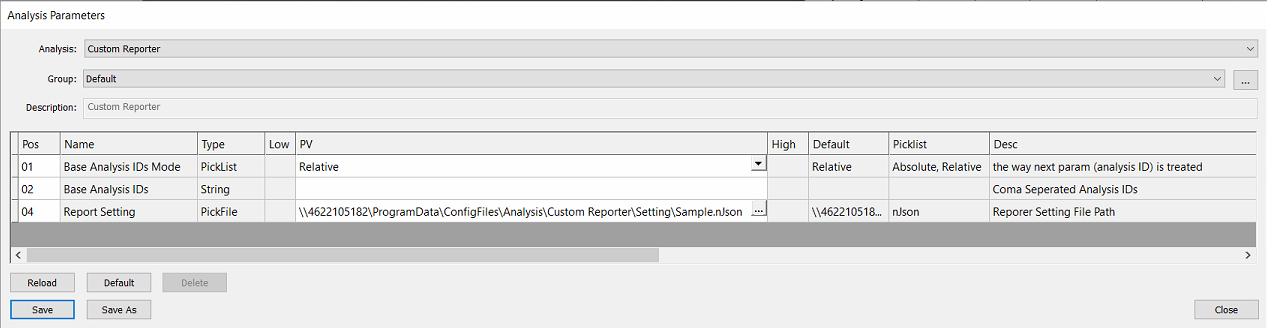
Param Name | Options | Description |
|---|---|---|
Base Analysis IDs Mode | Absolute, Relative |
See Post-Analysis Referencing section (Link) |
Base Analysis IDs |
|
See Post-Analysis Referencing section (Link) |
Report Setting |
| Select a nJson file of the import setting. |

Referencing Prior Analyses
For guidance on how to set up post-analysis referencing, visit the appendix page for Post-Analysis Referencing
Configuring the nJson File
The nJson file must be written and configured by Nanotronics Technical Service or Applications Engineers. To request a new custom reporting application that may require assistance, please contact support@nanotronics.ai to request support.