
Sub Scan Generator
Overview
The Sub Scan Generator is a nSpec analyzer that manages target scans for queued analyses. It has one (useful) parameter - Push / Pop, which can be set to either Push or Pop.
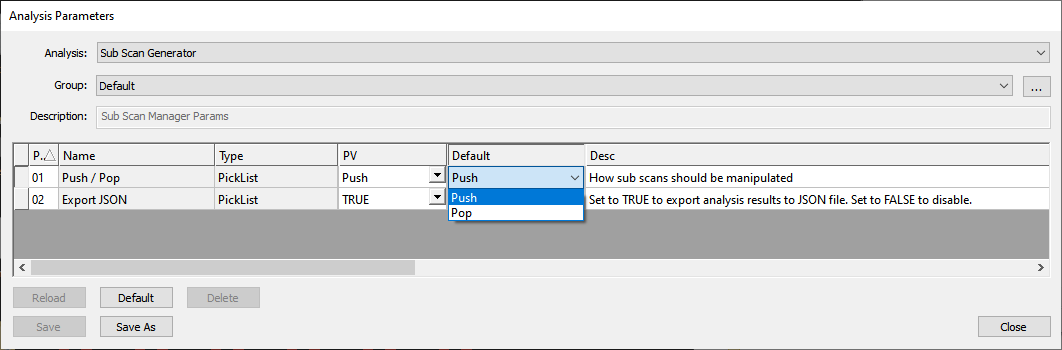
This analyzer is meant to be strategically placed within an analysis group of other analyzers.
For the following sections, the following terms will be used:
Pushed/Virtual Scan: Scan created when sub scan generator is run in push mode, which is described in the following section.
Source Scan: Scan that was the target of the sub scan generator.
Target Scan: Scan that is the target on non-sub scan generator analyses.
Push Mode
When the Sub Scan Generator’s Push / Pop parameter is set to Push, the generator is in push mode.
In push mode, the behavior of the Sub Scan Generator is:
When run as a standalone analysis (not in an analysis group):
A new virtual scan ID is created in the scan’s database
A new virtual scan folder will be created in the scan’s folder
The new virtual scan’s ID will be the biggest scan’s ID + 1
The scan property
Pushed ScanIDwill be written into theScanPropertiestable for the source and virtual scans. The scan property’s value will be the virtual scan’s ID
When run in an analysis group
Everything that happens when the sub scan generator is run as a standalone analysis happens here
The target scan is the newly created virtual scan
Pop Mode
When the Sub Scan Generator’s Push / Pop parameter is set to Pop, the generator is in pop mode.
In pop mode, the behavior of the Sub Scan Generator is as follows:
Nothing happens when run as a standalone analysis (not in analysis group):
When run in an analysis group
The target scan is the source scan, no matter what a previous sub scan generator did in push mode