
Scan Setting - Lot ID
Overview
Lot ID is an optional field that can be set in the Scan Settings dialog. It is saved to the database under Scan Properties.
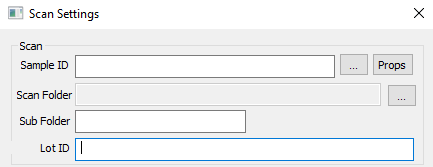
Lot ID Input Requirements
Must be 260 characters or less
Periods are valid characters, with the exception of leading and trailing periods. For example, “ABC.1”, is valid, but “.ABC1” or “ABC1.” are not valid.
Cannot contain any of the following characters: / \ : “ | > < * ?
Cannot contain tab characters
Cannot end in a space
Cannot be any of the following reserved names: NULL, CON, PRN, AUX, NUL, COM0, COM1, COM2, COM3, COM4, COM5, COM6, COM7, COM8, COM9, COM¹, COM², COM³, LPT0, LPT1, LPT2, LPT3, LPT4, LPT5, LPT6, LPT7, LPT8, LPT9, LPT¹, LPT², and LPT³
Empty strings are interpreted as “No Lot ID Specified”
Additionally, Lot ID is not case sensitive.