
nSpec v0.23.1.0 External Release Notes
nSpec Version 0.23.1.0
Release Date:
Documentation Updated:
Major Features: Report Summary Image Export
Overview
nSpec v0.23.1.0 includes a number of long-awaited bug fixes, fixes to bugs found in v0.23.0.0, deprecations, and new performance features and improvements, including Report Summary Image Export which allows users to automatically save nView generated reports.
Upgrading to v0.23.1.0

Library Update Not Required
If upgrading from a version more than 1 release prior, please reference all intermediate release notes for upgrade steps for each version.
Deprecations
There are a number of deprecations in nSpec v0.23.1.0, including deprecating use of the first generation autoloader. Customers with this autoloader version wishing to upgrade to v0.23.1.0 and beyond will require hardware upgrades.
Deprecation Changelog
Major Enhancements
Report Summary Image Export
Overview
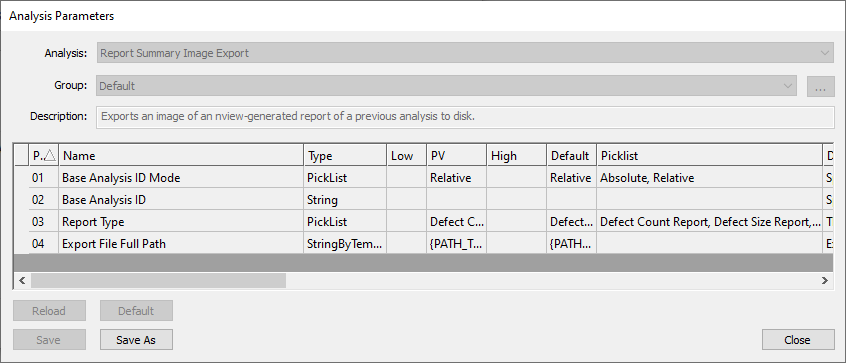
The Report Summary Image Export allows users to automatically export reports as PNG images by adding the Report Summary Image Export as part of a Group Analysis. This analyzer is meant to automate the process of opening up an analysis result, choosing the type of report to view, and exporting the selected report.
This analyzer must be used with a Base Analysis (i.e. must be used with a previous analysis), and can be used to export the following report types: Defect Count Report, Defect Size Report, Image Property Report, Defect Classification Report, Flatness Report.
The export file path can be customized with string templates using the Export File Full Path parameter. For more on available string templates, refer to Export File Full Path Parameter.
Export Compatibility
Note that not all report types are compatible with all types of analyses.
For example, an Image Property Report can only be exported following a Surface Scattering Analysis, and a Defect Classification Report can only be exported following an analysis that includes defect classification, for example, after an AI Analysis. The selected Report Type must be appropriate for the analysis that it follows, otherwise the Report Summary Image Export will not have the correct data or analysis to generate the selected report from.
The quickest way to understand what report types are available for a given analysis is to view analysis results (nSpec Main View > Analysis > View Analysis Results…) and see what reports are available to view in nView. The example below shows the available report options for a Device Inspection Analysis.

New Features
Highlights
NSPEC-4508: nSpec can apply global X, Y, Z offsets to aid in tool synchronization
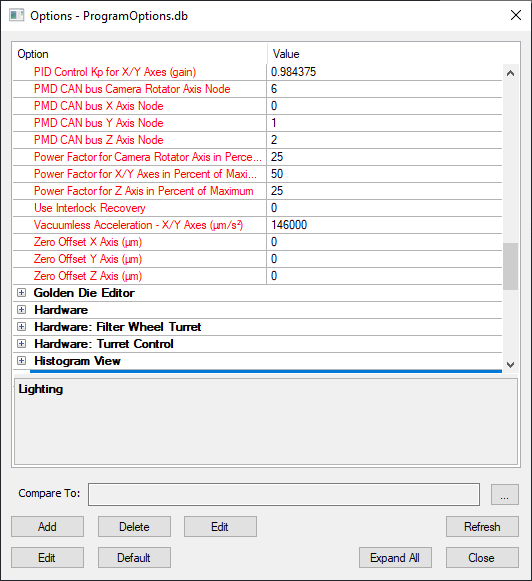
Three new program options have been introduced to aid in tool synchronization. Zero Offset X Axis (µm), Zero Offset Y Axis (µm), and Zero Offset Z Axis (µm) can be found in the Controller: Stage section Program options. In most use cases, tools only require the Z axis to be offset for synchronization, and the X and Y offsets can be kept at the default of 0.
NSPEC-6304: Ability to automatically export reports via new Report Summary Image Export
Certain reports can be automatically saved in PNG form by adding Report Summary Image Export Post-Analysis to a Group Analysis. See more in the Major Enhancements section.
NSPEC-6990: Add an Export Destination for Cropped Images Analyzer
Cropped Images Analyzer now allows users to specify a destination path for exports.
Parameter | Current Description | Suggested Description |
|---|---|---|
Export Destination | Select a folder to save the Cropped images | Select a folder to save the Cropped images. If empty, will save to the scan’s Analysis folder. |
Export Folder Name | Type the name of the folder to save the Cropped images | Type the name of the folder to save the Cropped images. If empty, the folder’s name will be automatically filled. |
NSPEC-7598: Updated Nanotronics Illuminator Board Supports Third Light Source
New revision to nSpec hardware will allow for a third controllable light source.
NSPEC-7834: Cropped Images Analyzer ability to save all defects to single TIFF stack
Cropped Images Analyzer now has the ability to export defect images to a single TIFF stack. To save all defects to a single TIFF stack, choose the “Export as Multi-Page Images” option. “Export as Separate Images” will export each defect as its own JPG file.
New Features Changelog
Bug Fixes
Highlights
NSPEC-5953: Group jobs specifying different slots fail to load wafers
This bug made it such that when running a group job in which different jobs are run on different wafers, e.g. running a group job in which job A is run on the wafer in slot X, and job B on a wafer in slot Y, nSpec fails to move the wafer from slot X from the stage and continues to run job B on the wafer from slot X.
NSPEC-6043: “Scan Pattern Exceeds…” pop-up blocks cassette production flow when using Bare Wafer Alignment
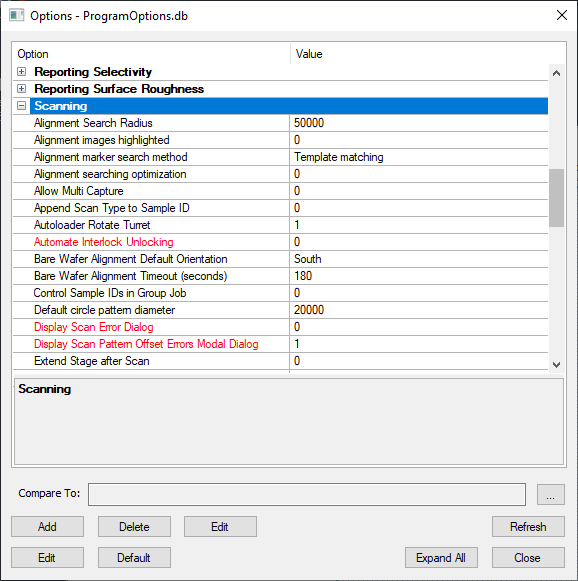
A ”Scan Pattern Exceeds Stage X maximum by 0.000000 microns” message pops up on every wafer when running a wafer scan, wafer cassette job, loop job, or loop scan when the pattern offset is set to 0 for X and Y. A new Program Option Display Scan Pattern Offset Errors Modal Dialog can be set to prevent this message from popping up and disrupting the scan.
This new option defaults to 1, which allows the above blocking popup to display, and allows the operator to respond accordingly. If set to 0, the blocking modal dialog will not display and the scan will continue without disruption, with the calculated offset and error written to the log.
The Display Scan Pattern Offset Errors Modal Dialog option can be found under the Scanning tab.
NSPEC-7540: Scan fails during looped job when nSpec tries to locate wafers in slots that are empty
nSpec will map the cassettes correctly before the start of the looped job, but will not correctly follow that map when scanning. The first cassette will scan and analyze correctly, but on the second cassette, nSpec will try to locate a wafer where there is none, which causes the job to fail.
NSPEC-7615: Gen IV AI model trained with nTelligence 5.0.0.4 not as accurate as models trained with nTelligence 5.0.0.1
There was a bug in nTelligence 5.0.0.4 in which trained Gen IV AI models had worse performance when compared to models trained in nTelligence 5.0.0.1. Models trained with 5.0.0.4 were seen to have an increase in false positive for larger defects, and not detect smaller defects at all.
NSPEC-7665: Manual Set Autofocus Type broken for group jobs
When setting up a group job in which jobs have scan settings with Autofocus Type set to Manual Set with different Initial Z Position, jobs would all be run with the Initial Z Position of the first job.