
Export File Full Path Parameter
Overview
Users can dynamically name export files using string templates via the Export File Full Path parameter, available for select analyses. Currently, the parameter is available for Custom Reporter, Custom Exporter, Cropped Images, and Report Summary Image Export analyses.
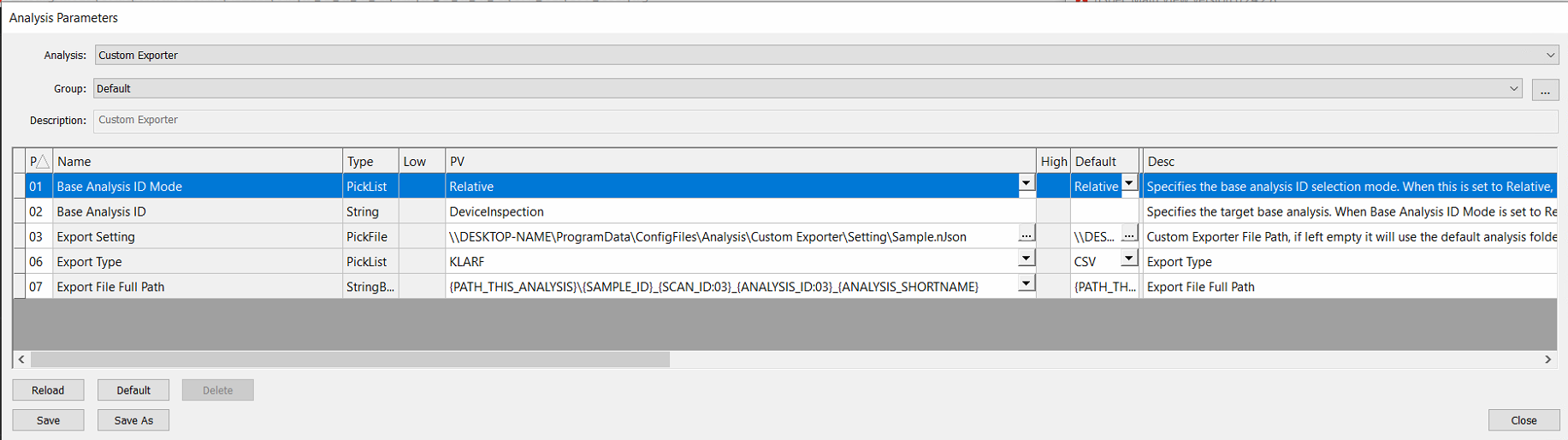
Example String Template Usage
Here is an example of string template usage for the Export File Full Path parameter in Cropped Images Analysis.
The following input: {PATH_THIS_ANALYSIS}\{SAMPLE_ID}_{SCAN_ID}_{ANALYSIS_ID}_{ANALYSIS_SHORTNAME}\defect_{DEFECT_ID}
Results in the following export path:
C:\Scans\ExampleSampleID\Analysis\Analysis_001_002\ExampleSampleID_001_002_Cropped Image Generator\defect_12345
Table of Supported String Templates
Currently, under the Post-Analysis Support column, “All” refers to the analyses that this feature has been implemented for: Custom Exporter, Custom Reporter, Cropped Images, and Report Summary Image Export.
Variable Name | Description | Post-Analysis Support |
|---|---|---|
PATH_DB | Folder that Contains the image database | All |
PATH_SCAN | Scan destination folder, the folder that contains “Scan_001” etc ex: | All |
PATH_ANALYSIS | The incremented analysis destination folder within the scan folder. | All |
PATH_THIS_ANALYSIS | The incremented analysis destination folder within the scan folder. | All |
SAMPLE_ID | Parent scan’s sample ID | All |
MACHINE_NAME | Name of machine (Device name in PC’s settings System → About) | All |
JOB_NAME | Name of job that created parent scan | All |
SCAN_ID | Parent scan’s ID | All |
LOT_ID | References the Lot ID that users can input into the Job | All |
ANALYSIS_GROUP_NAME | Parent group analysis' name (error if analysis is not part a group analysis) | All |
ANALYSIS_ID | Analysis' ID | All |
ANALYSIS_SHORTNAME | Analysis' IntName as shown in Main View → Utility -> Edit Analyses... | All |
ANALYSIS_DISPLAYNAME | Analysis` Name as shown in Main View → Utility -> Edit Analyses... | All |
DATETIME | Analysis' completion time with format: | All |
TARGET_ANALYZER_DISPLAYNAME | Target analysis' Name as shown in Main View → Utility -> Edit Analyses... | All |
TARGET_ANALYZER_SHORTNAME | Target analysis' IntName as shown in Main View → Utility -> Edit Analyses... | All |
TARGET_ANALYSIS_DATETIME | Target analysis' completion time with format: | All |
TARGET_ANALYSIS_ID | Target analysis' ID | All |
DEFECT_IMAGE_ID | Cropped defect’s parent image ID | Cropped Images |
DEFECT_DEVICE_ID | Cropped defect’s parent device ID | Cropped Images |
DEFECT_DEVICE_NAME | Cropped defect’s parent device name | Cropped Images |
DEFECT_ID | Cropped defect’s ID | Cropped Images |
DEFECT_CLASSIFICATION | Cropped defect’s classification name ( | Cropped Images |
TARGET_ANALYSIS_DESCRIPTION | Reporting image export’s Report Type | Report Summary Image Export |