
KLARF Export Properties
Overview
Most of the information needed for KLARF export is retrieved from the scan and analysis automatically.
Some pieces of information need to be entered manually in the properties pop-up on the Scan Dialog. For some critical missing fields, nSpec allows users to set Job Properties that will then populate certain KLARF fields.
KLARF Related Job Properties
Job Property | Valid Values | Description |
|---|---|---|
OrientationMarkLocation | UP, DOWN, LEFT, RIGHT | Info for KLARF export if waferloader is not being used. |
SampleOrientationMarkType | FLAT, NOTCH | Info for KLARF export if waferloader is not being used. |
SetupID | <value> | Info for KLARF export if not using external integration. |
SlotNumber | <value> | Info for KLARF export if waferloader is not being used. |
StepID | <value> | Info for KLARF export if not using external integration. |
WaferCenterX | <value> | Vector from nSPEC alignment origin to the center of the wafer (x component) |
WaferCenterY | <value> | Vector from nSPEC alignment origin to the center of the wafer (y component) |
Usage Instructions
Before integrating with customers' host data systems, the SetupID and StepID need to be entered:
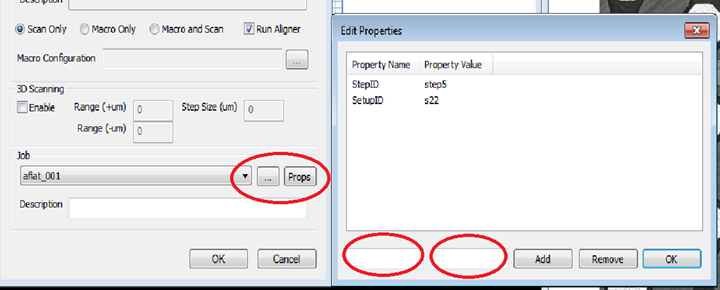

DeviceID field is the same as the SetupID field for some customers
Additionally, the following information is retrieved from the autoloader, if an autoloader 2 is connected to NSpec and enabled:
SampleOrientationMarkType
SlotNumber
WaferID
If an autoloader 2 is connected and enabled, the SampleSize width field in the KLARF output can be set with the SampleLength job property.
If an OCR camera is not available, the WaferID will not be read and instead, the WaferID value in the KLARF export will default to the Sample ID of the scan.
In case an autoloader 2 is not available, the value for SampleOrientationMarkType and SlotNumber can be entered manually in the properties pop-up as well.
SampleOrientationMarkType can either be: FLAT or NOTCH
SlotNumber refers to the slot in the cassette the wafer is taken from and may not be applicable in case an autoloader is not available.
In addition to the SampleOrientationMarkType, the OrientationMarkLocation property is used to indicate the direction the notch or flat is pointing. OrientationMarkLocation can be: UP, DOWN, LEFT, RIGHT.
The KLARF format has a reference device at coordinate 0, 0. Right now the NSPEC alignment origin should be set at the lower left corner of that device. To enable other systems to use KLARF files generated from NSPEC, The user can enter the properties: WaferCenterX and WaferCenterY that would describe a vector from the NSPEC alignment origin to the center of the wafer.