
nSpec v0.24.1.0 External Release Notes
nSpec Version 0.24.1.0
Release Date:
Documentation Updated:
Major Features: Review Scan Updates, String Template Formatting
Overview
nSpec v0.24.1.0 contains many new updates, quality of life improvements, critical bug fixes, and some deprecations.
Review scans can now run after any analysis that produces defects, enabling the powerful use of review scanning in more workflows. String templates can now be formatted using the {fmt} library, and can be used to dynamically name sample IDs. Additionally, users should see reductions in average analysis execution time due to performance improvements.
Upgrading to v0.24.1.0

Library Update Not Required
If upgrading from a version more than 1 release prior, please reference all intermediate release notes for upgrade steps for each version.
Due to a bug found in v0.24.1.0, systems with GT cameras should not upgrade to v0.24.1.0, and instead upgrade to v0.24.1.2 which includes the bug fix. For more context, see NSPEC-8407.
Deprecation
NSPEC-8304: Migrate string formatting to {fmt} library
String templates are now formatted via the {fmt} library and existing template usage will cause breakages.
Generally, fixing these breakages involves:
Replacing any bare
{with{{and}with}}Replacing any
$(with{and)with}
See Changes to String Template in v0.24.1.0 for more information.
NSPEC-8506: Legacy support for automatically appended OCR IDs
Previously, when using an autoloader with an OCR, the scanned OCR ID would always be appended to the Sample ID. This behavior is now deprecated in v0.24.1.0 now that string templates have been introduced for sample naming.
Customers relying on this behavior and using blank sample ID names will need to make changes to their jobs by using {OCR} for the Sample ID field, or enable new program option Always Append OCR ID (legacy support).
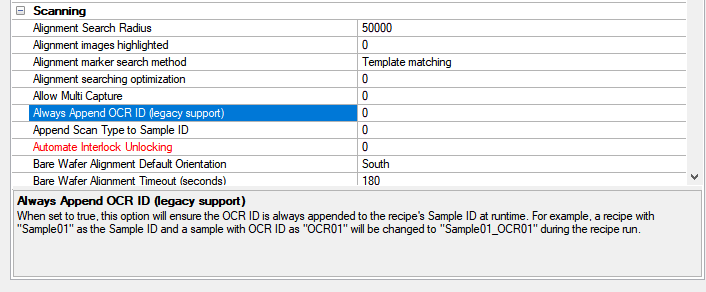
Deprecation Changelog
Major Enhancements
Changes to Review Scanning in v0.24.1.0
Multiple backend improvements to review scanning in nSpec v0.24.1.0 allow for review scans to be utilized in many more workflows, most notably by enabling review scans to run after any defect-type analysis.
Program Option Recommendation
Due to the new changes to review scanning, we recommend that customers running review scans disable the following program options, both located under the Scanning section: Job Error Also Fails Sample, and Sample Error Also Fails Cassette.
Review Scans no longer require KLARF inputs
Previously, review scans could only be run following scans that generated KLARF exports. Now, review scans can be conducted immediately following any defect-type analysis scan (e.g. Device Inspection, Basic Selection).
Review Scan targets defects from previous job by default
The review scan Defects field has a new option – Analysis from Previous Job – which allows users to target the defects found in the job immediately preceding the review scan. This option makes the assumption that the wafer has not been moved from the stage following the previous job.
If the Defects field is left blank, it will be set to Analysis from Previous Job upon saving the job.

Changes to String Templates in v0.24.1.0
Internal changes to string templates in nSpec v0.24.1.0 now allows nSpec users to format string templates wherever they are used. Additionally, string templates can now be used to name samples when running jobs.
Migration to {fmt} formatting
For all string templates, nSpec will now use {fmt} library style formatting which will allow users to easily format templates. A {fmt} cheat sheet can be found here, and full documentation can be found here.

This change will break existing string template usage.
Generally, fixing these breakages involves:
Replacing any bare
{with{{and}with}}Replacing any
$(with{and)with}
For example, $(PATH_THIS_ANALYSIS)\$(SAMPLE_ID)_$(SCAN_ID)_$(ANALYSIS_ID)_$(ANALYSIS_SHORTNAME)\defect_$(DEFECT_ID)
would become
{PATH_THIS_ANALYSIS}\{SAMPLE_ID}_{SCAN_ID}_{ANALYSIS_ID}_{ANALYSIS_SHORTNAME}\defect_{DEFECT_ID}
Additionally, this migration allows users to format string templates. For example, if the Lot ID for a scan is foo, then {LOT_ID:A<6} will resolve to fooAAA.
String Templates for Sample Naming
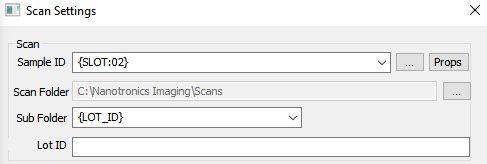
String templates can now be used to dynamically name the sample ID and subfolder fields in the Scan Settings dialog.
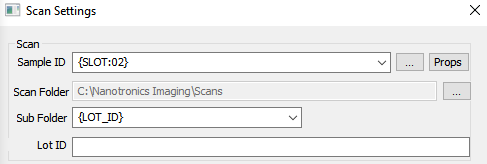
Below are all the variables that can be used in sample naming string templates.
Variable Name | Description |
|---|---|
DATETIME | The time at the moment when the scan name is set. Output format: For example, |
ILLUMINATION | The abbreviated illumination modality for the active image settings group during scanning: Brightfield (BF), Darkfield (DF), Differential Interference Contrast (DIC), and Transmitted (TX). For example, when running a scan in brightfield, |
JOB_NAME | Name of current job |
LOT_ID | Name of Lot ID |
MACHINE_NAME | Name of machine ( |
OBJECTIVE | The active objective in use during the scan |
OCR | The value read from the OCR camera |
SKIP | When used in the multi-sample input dialog, this skips the target slot. Note: This behaves identically to |
SLOT | The slot that the wafer was pulled from in the autoloader. If slot information was not available for any reason, this will output “00”. Note: Values will be output with a preceding 0 if the slot number is less than 10. |
New Features
Highlights
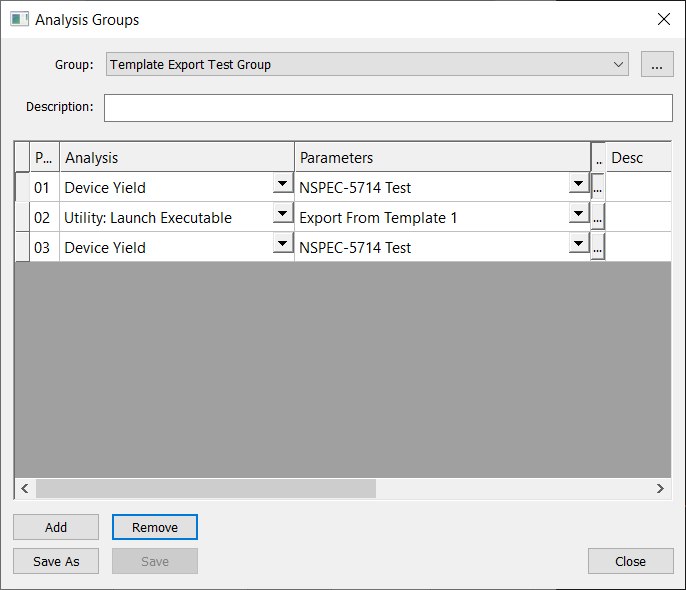
NSPEC-4098: Analysis parameters can be edited from the Analysis Groups dialog
Analysis parameters can be edited from the Analysis Groups dialog by pressing the three dots button, found between the Parameters and Desc columns.
NSPEC-8098: Utility: Launch Executable analysis uses standard post-analysis referencing system
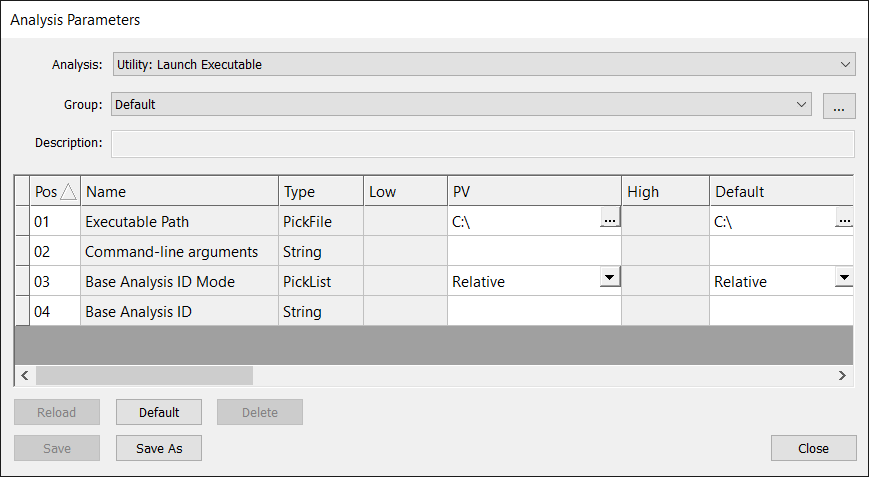
The Utility: Launch Executable analysis now has two ways of supplying a target analysis for an executable script. The existing method via the Command-line arguments parameter can still be used. Alternatively, users can now use nSpec’s standardized post-analysis referencing method of referencing absolute or relative base analyses. For more, see Post-Analysis Referencing.
If $LAST_ANALYSIS_ID is supplied via the Command-line arguments parameter, the Base Analysis ID parameter will be ignored.
NSPEC-8174: String templates for sample naming
Users can now use string templates to dynamically name the sample ID and sub folder input fields in the Scan Settings dialog. Full list of supported string templates for the Sample ID and Sub Folder fields can be found under the Changes to Review Scanning in v0.24.1.0 section.
NSPEC-8284: Review scanning enabled following any aligned scan type with defects
Previously, review scans could only be run following scans that generated KLARF exports. Now, review scans can be conducted immediately following any defect-type analysis scan (e.g. Device Inspection or Basic Selection).
NSPEC-8341: New Global Program Option "Pixel Transit Per Exposure"
During continuous scanning, global program option Pixel Transit Per Exposure defines the number of pixels the stage is permitted to transit during a single exposure period at maximum velocity. This program option is found under the Scanning section.
This value can be overwritten for individual jobs by setting the job property cs-allowable-pixels-motion-blur.

New Features Changelog
Bug Fixes
Highlights
NSPEC-7862: "Mapper Margin of Error %" value not used when mapping cassettes in autoloader systems
The Mapper Margin of Error % was being ignored when mapping cassettes in autoloader systems. Now, when wafers in cassettes are mapped and found to be in unexpected positions, nSpec will print a warning that the mapping data is outside the wafer detection tolerance, e.g. the wafers are setup imprecisely, or the error margin is too small.
NSPEC-8270: Parameter groups for analyses in analysis group don't update properly
When editing an existing analysis group, changing an analyzer would not immediately update the corresponding analysis parameter group, and would require two analysis group changes before properly updating.
NSPEC-8277: High Resolution Mosaic Generator sometimes hangs when running in virtual wafer mode
An issue running the High Resolution Mosaic Generator in virtual wafer mode with parameter Compression Factor 1 set to 0.3 caused the generator to hang has been fixed.
NSPEC-8351: Objectives should move to position selected in program option Autoloader Turret Parking Position
Previously, autoloader systems with linear optics and objective turrets would default to switching to the shortest, usually 5x, objective when the robot performed its wafer loading routine. Now, the objective that the system switches to during this routine is defined by the Autoloader Turret Parking Position program option, which can be found in the Autoloader section of program options.
NSPEC-8477: Vieworks cameras running newer firmware throw a GenTL error on initialization when GenICam Region of Interest is enabled
Vieworks cameras running newer firmware may not support setting the offset values set by the Genicam Region of Interest Horizontal Offset and Genicam Region of Interest Vertical Offset program options, which are located in the Camera section of program options. If a system’s camera does not support this, a message can be logged in nSpec’s debug log when the program options are ignored. This message can be enabled by activating the CAMERA_DETAILS category in the Dbglog Settings, found at nSpec > Utility > Debug Log…